Customizing digital pen performance
HP Pen Control is a straightforward utility that enables users to personalize their HP digital pen’s button functions for improved workflow and efficiency. It allows quick customization of shortcuts, letting users open applications, switch tools, or perform commands effortlessly. With responsive input handling, it enhances digital drawing, note-taking, and editing across creative and professional environments.
Top Recommended Alternative

HP Pen Control simplifies pen customization on compatible HP devices. It allows users to assign shortcuts or actions to pen buttons for a smoother workflow. Designed for precision and ease, it benefits artists, students, and professionals seeking a personalized digital writing experience.
Enhanced customization for everyday use
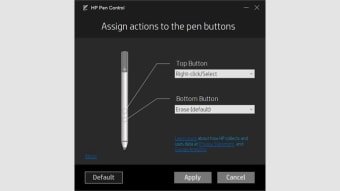
HP Pen Control focuses on flexibility and ease of use. Users can easily modify button functions, typically the barrel and top buttons, to perform specific commands or shortcuts that suit their workflow. These configurations can include opening frequently used programs, undoing actions, or activating eraser modes. The settings are instantly applied, making adjustments seamless without requiring a system restart or additional drivers.
The software’s layout is clean, minimal, and uncluttered, allowing users to navigate settings quickly and efficiently. It automatically detects compatible HP pens, reducing manual setup and potential compatibility issues. Lightweight and unobtrusive, it runs silently in the background, consuming minimal system resources. This efficiency supports uninterrupted creativity, particularly for artists using drawing applications or designers working with precision-based multimedia software.
While reliable, the software’s functionality is somewhat limited compared to advanced stylus tools. It does not support multi-device syncing or advanced pressure curve customization, which may be preferred by professional illustrators. Additionally, users of non-HP devices cannot benefit from its features, as it is tailored exclusively for HP’s ecosystem. However, for its intended audience, the software remains stable, effective, and purpose-driven.
Streamlined control for HP pen users
HP Pen Control provides a simple yet practical solution for users seeking a tailored pen experience. Its clean interface, instant configuration options, and lightweight performance make it ideal for everyday creative and professional tasks. Though it lacks some advanced customization tools, it succeeds in enhancing usability, comfort, and precise control for digital pen workflows, particularly for those within HP’s hardware ecosystem.